Privacy Overlay3.0.14
Publisher Description

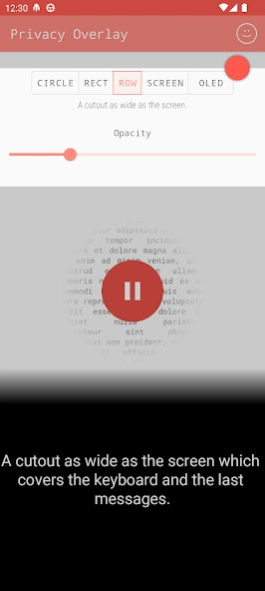


Stop people from reading your texts.
This screen filter will let you cover most of your screen except a small cutout.
You can move and resize the mask, so you yourself can still see everything.
The rectangle is as wide as the screen so it's perfect for texting. The small circle is ideal for even more secret things.
🌑 The new "OLED" mode turns the screen completely black while keeping the device on. It's perfect for listening to music without stopping the app.
Protect your privacy from:
🔒 Strangers on the bus, train, subway or plane
🔒 Nosy friends and family
🔒 Strict bosses and colleagues
🔒 Shoulder surfing and other social engineering techniques
Useful for:
🛡️ Hiding "not safe for work" (NSFW) content.
🛡️ Logging in securely with your PINs, passwords or passcodes.
🛡️ Dimming the screen even further than normally possible.
This screen guard can hide your confidential data from strangers looking over your shoulder.
It hides the background with a shade to keep your sensitive content private from observers. It works with WhatsApp, Telegram, Signal or any other chatting app.
It's very simple to use:
The screen filter will stay active even when you close the app.
Drag the red dot to move the hole. Double tap it to make it bigger.
You can also change the opacity and shape.
The overlay can also be started from the home screen with a shortcut. Or even from the quick settings tile.
All functions can be used for free but there is a short ad for one of my other apps. I purposefully didn't implement normal ads from the big ad networks to protect your user data. You can remove the ad with a cheap in-app-purchase.
No additional downloads, no service that runs all the time! :-)
About Privacy Overlay
The company that develops Privacy Overlay is K.J.M.. The latest version released by its developer is 3.0.14.
To install Privacy Overlay on your Android device, just click the green Continue To App button above to start the installation process. The app is listed on our website since 2023-09-17 and was downloaded 98 times. We have already checked if the download link is safe, however for your own protection we recommend that you scan the downloaded app with your antivirus. Your antivirus may detect the Privacy Overlay as malware as malware if the download link to com.kjm.privacyoverlay is broken.
How to install Privacy Overlay on your Android device:
- Click on the Continue To App button on our website. This will redirect you to Google Play.
- Once the Privacy Overlay is shown in the Google Play listing of your Android device, you can start its download and installation. Tap on the Install button located below the search bar and to the right of the app icon.
- A pop-up window with the permissions required by Privacy Overlay will be shown. Click on Accept to continue the process.
- Privacy Overlay will be downloaded onto your device, displaying a progress. Once the download completes, the installation will start and you'll get a notification after the installation is finished.
Program Details
System requirements
Download information
Pricing
Version History
version 3.0.14
posted on 2023-09-17
Three new modes:
- Rectangular cutout
- Full screen dimming
- Full screen completely black
